Platform
Cookie Banner
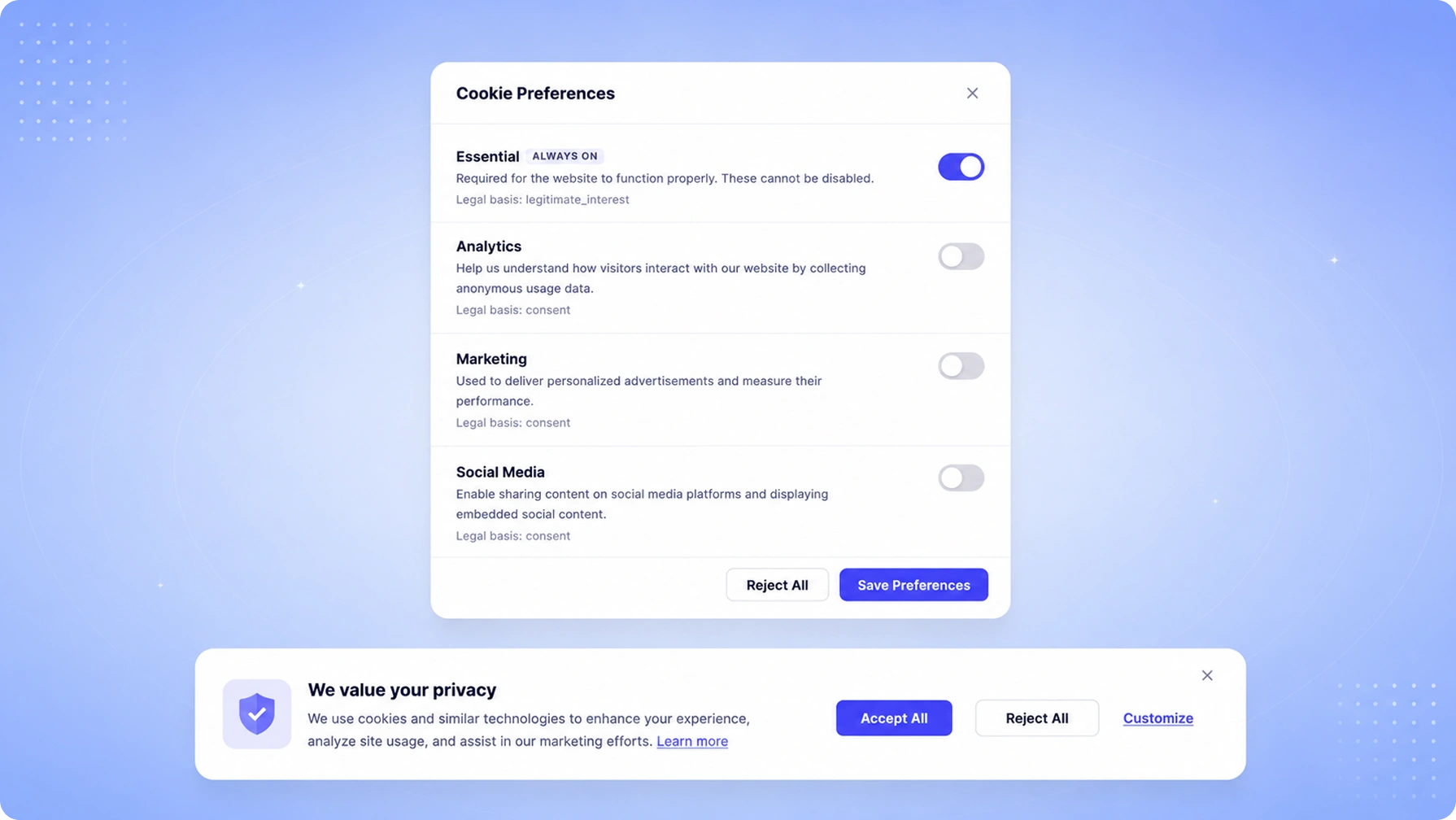
Launch a fully compliant cookie consent banner that respects user preferences, blocks tracking scripts by default, and syncs consent to your CMP — in under 10 minutes.
Benefits
Why teams choose Cookie Banner
Auto Script Blocking
Automatically block analytics, marketing, and third-party scripts until consent is given.
Geo-Based Rules
Show different banner experiences based on visitor location to comply with local laws.
Design Customization
Match your brand perfectly with a no-code banner designer and CSS overrides.
A/B Testing
Test different banner designs and messages to optimize consent rates without compromising compliance.
Capabilities
What Cookie Banner does
Automatic Cookie Scanning
TruePrivacy scans your website to detect all cookies and tracking technologies — first-party and third-party — categorizes them, and populates your cookie declaration automatically. The scan runs on every deployment to catch new cookies before they reach production.
Script Blocking by Default
Third-party scripts are blocked by default until a visitor provides consent. The banner injects approved scripts only for the categories a user has consented to, ensuring no tracking pixels or analytics fire before consent is collected.
Geo-Based Consent Rules
Detect visitor location and apply the appropriate consent experience — a full opt-in banner with reject option for EU visitors, a CCPA opt-out notice for California residents, or a simplified notice for jurisdictions with no current banner requirement.
Google Consent Mode v2
Native integration with Google Consent Mode v2 passes consent signals directly to Google Analytics and Google Ads in the required format, ensuring modeling data is collected appropriately even when users decline full analytics consent.
IAB TCF 2.2 Compliance
The banner is certified compliant with the IAB Transparency and Consent Framework 2.2, enabling proper consent signaling to all TCF-registered vendors in your ad stack.
No-Code Design Customization
A visual editor lets your marketing or design team customize banner position, colors, text, button styles, and layout without touching code. CSS override access is available for engineering teams who need pixel-perfect control.
How It Works
From setup to compliance
A few straightforward steps — no consultants required.
Add One Line of JavaScript
Paste a single script tag into your website's <head>. TruePrivacy loads asynchronously so it has no impact on page performance or your existing scripts.
Scan & Categorize Cookies
TruePrivacy automatically scans your site, identifies all cookies and trackers, and categorizes them as necessary, analytics, marketing, or preferences using its database of over 5,000 known cookies.
Configure Your Banner
Use the no-code banner designer to set your preferred layout, colors, text, and geo rules. Preview the banner for different user locations before publishing.
Collect & Record Consent
The live banner collects visitor choices, blocks scripts accordingly, and syncs every consent record to your TruePrivacy consent ledger for regulatory proof.
Included
Everything in the box
- One-line JavaScript embed
- IAB TCF 2.2 compliant
- Auto cookie scanning
- Category-based consent (necessary, analytics, marketing)
- Google Consent Mode v2 integration
- Real-time consent analytics dashboard
FAQ
Frequently asked questions
No. The TruePrivacy banner script loads asynchronously and is served from a global CDN. The core script is under 15KB gzipped. Our median time-to-interactive impact across customer sites is under 50ms, and the banner is designed to not cause layout shift (CLS impact is zero).
TruePrivacy replaces third-party script tags with placeholder elements that store the original src attribute. When a user consents to a category, TruePrivacy dynamically creates the actual script tag and inserts it into the DOM. For tag manager-based implementations, it blocks the relevant tag manager triggers instead.
Yes. TruePrivacy integrates with Google Tag Manager in two ways: as a GTM template available in the community template gallery, and as a direct integration that passes consent state as GTM data layer variables so your existing tags can fire conditionally based on consent.
Yes. The A/B testing feature lets you define two or more banner variants and split traffic between them. The analytics dashboard shows consent rates per variant so you can identify which design yields higher opt-in rates without compromising compliance.
TruePrivacy detects common ad blockers and can show a fallback message when its script is blocked. Since consent cannot be reliably collected for ad-blocked visitors, the system defaults to treating them as if they have declined non-essential cookies, which is the safest compliant default.
Yes. The banner is specifically designed for ePrivacy Directive compliance, which governs cookies separately from GDPR in the EU. It implements prior consent for non-essential cookies and provides the required information about cookie purposes as mandated by the Directive.
Ready to automate Cookie Banner?
Join hundreds of teams using TruePrivacy to manage privacy operations at scale.
Free 14-day trial · No credit card required · Setup in minutes