Platform
RoPA Automation
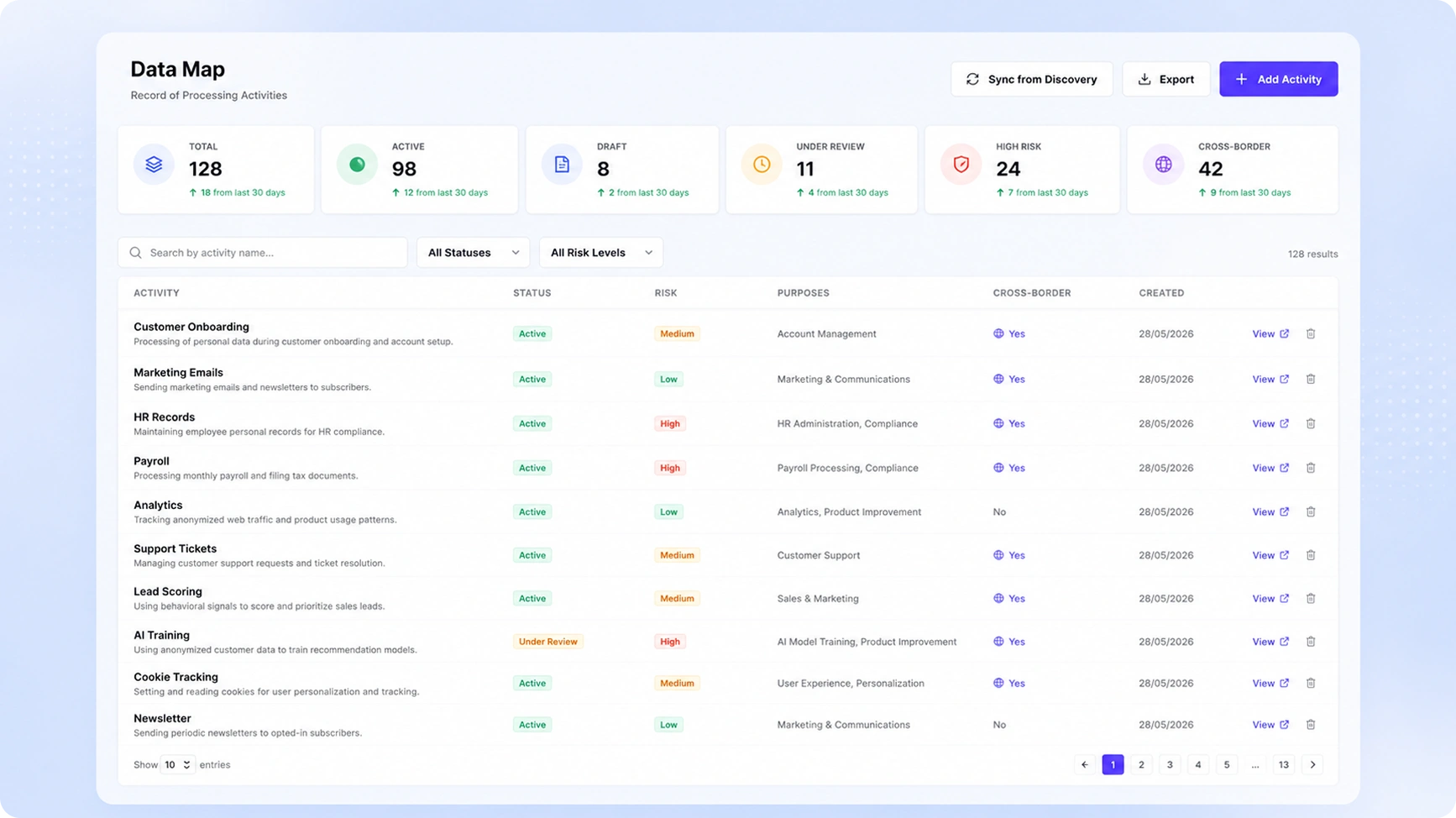
Stop maintaining your RoPA in spreadsheets. TruePrivacy auto-populates and continuously updates your Article 30 record from live data discovery, saving hundreds of hours annually.
Benefits
Why teams choose RoPA Automation
Auto-Population
Data discovery results automatically create and update RoPA entries with no manual input.
GDPR Article 30 Compliant
Every required field from Article 30 is captured and maintained automatically.
Business Process Linking
Link processing activities to business processes and owners for accountability.
Multi-Entity Management
Manage RoPAs for multiple legal entities, processors, and joint controllers.
Capabilities
What RoPA Automation does
Auto-Population from Discovery
Data discovery results automatically create and update RoPA entries. When a new data store is discovered or an existing one changes, the corresponding processing activity record is updated without manual intervention.
GDPR Article 30 Field Mapping
Every field required by GDPR Article 30 for both controllers and processors is captured and maintained — processing purposes, data categories, recipients, international transfers, retention periods, and technical/organizational security measures.
Business Process Linking
Link processing activities to the business processes and owners they support, providing the accountability structure that regulators expect and that helps employees understand why data governance rules exist.
Retention Schedule Integration
Define retention rules per processing activity and data category. Retention schedules are enforced by the data retention module and tracked in the RoPA for each processing activity.
Multi-Entity Management
Manage RoPAs for multiple legal entities, controller-processor relationships, and joint controller arrangements from a single platform. Consolidate for group reporting or view separately for entity-level compliance.
DPA-Ready Export
Export a fully formatted, printable RoPA in PDF or Excel format on demand. The export includes all Article 30 fields and is structured to match the templates issued by major European DPAs.
How It Works
From setup to compliance
A few straightforward steps — no consultants required.
Connect Data Sources
Connect your systems via TruePrivacy integrations. Data discovery automatically populates the RoPA with processing activities as they are discovered across your connected systems.
Enrich Records
Business and legal teams complete the processing activity records with purposes, legal bases, retention periods, and security measures using guided forms that ensure no required field is missed.
Review & Validate
DPO and legal team review and approve the completed RoPA. The review workflow tracks approvals per processing activity and records who validated each entry.
Maintain Automatically
The RoPA updates continuously as your systems change. Alerts notify record owners when processing activities change so records stay current between formal reviews.
Included
Everything in the box
- Auto-population from data discovery
- GDPR Article 30 field mapping
- Multi-entity support
- Retention schedule management
- Export to PDF, Excel, and CSV
- DPA-ready report format
FAQ
Frequently asked questions
Under GDPR Article 30, most organizations processing personal data are required to maintain a RoPA. The exemption for organizations with fewer than 250 employees is narrow — it does not apply if processing is likely to result in a risk to data subjects, is not occasional, or involves special category data. Most businesses above a very small size should maintain a RoPA regardless of headcount.
Continuous background scanning detects changes in connected systems. When new data categories appear in a system, a new integration is added, or an existing integration is removed, the affected processing activity records are flagged for review. Record owners receive notifications and can update records directly from the alert.
Yes. TruePrivacy provides a CSV import template that maps your existing spreadsheet columns to the RoPA data model. Imported records are immediately editable in TruePrivacy and start benefiting from continuous update monitoring.
DPAs typically request your Article 30 RoPA as part of a formal investigation or audit. They check that all mandatory fields are completed, that legal bases are documented for each processing activity, and that international transfers have appropriate mechanisms in place. TruePrivacy's export format is specifically structured to satisfy these checks.
Ready to automate RoPA Automation?
Join hundreds of teams using TruePrivacy to manage privacy operations at scale.
Free 14-day trial · No credit card required · Setup in minutes