Platform
Endpoint Agent
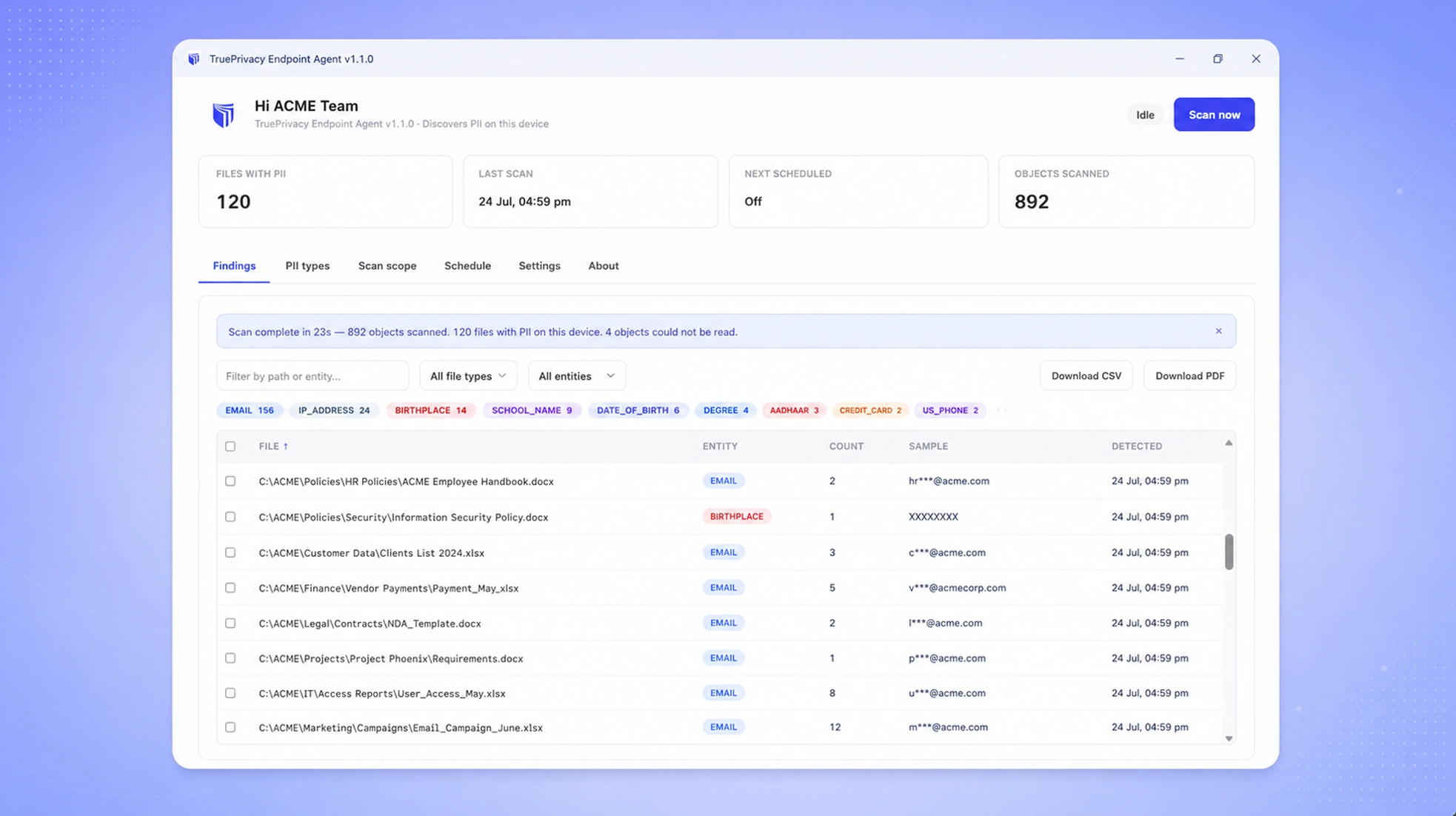
Exported CSVs, downloaded reports, and stray spreadsheets on employee devices are full of names, emails, phone numbers, national IDs, payment card numbers, and health identifiers — where cloud scanners can't see them. The TruePrivacy Endpoint Agent detects 100+ PII types locally on macOS, Windows, and Linux machines and reports only findings — masked samples and hashes, never the raw data.
Benefits
Why teams choose Endpoint Agent
Findings-Only Egress
Raw file contents never leave the device. Only file paths, masked samples, and cryptographic hashes are reported to your dashboard.
Scans Where Data Hides
Laptops and desktops hold exported CSVs, downloaded reports, and stray spreadsheets full of customer emails, phone numbers, Aadhaar and SSN numbers, and card data that cloud scanners never see.
100+ PII Types Detected
Names, email addresses, phone numbers, national IDs (SSN, Aadhaar, PAN, passport numbers), payment cards, bank accounts, health identifiers, IP addresses, and dates of birth — detected entirely on-device.
Polite by Design
Throttled, incremental scanning keeps CPU and disk usage unobtrusive — employees won't even notice it running.
Zero-Touch Fleet Rollout
Enroll devices with a single key, verify them with mutual TLS, and manage the whole fleet from the TruePrivacy dashboard.
Complete PII Footprint
Endpoint findings flow into the same dashboard as your SaaS and cloud sources, so DSRs, RoPA, and breach response cover the data on laptops too.
Capabilities
What Endpoint Agent does
On-Device PII Detection
The agent scans documents, spreadsheets, PDFs, and text files locally using the same detection engine as the TruePrivacy platform — names, email addresses, phone numbers, national IDs like SSN, Aadhaar, PAN, and passport numbers, payment card and bank account numbers, health identifiers, IP addresses, and dates of birth. Detection happens entirely on the endpoint; no file content is uploaded for analysis.
Privacy-Preserving Reporting
After each scan, the agent reports findings only: the file path, the entity type detected, a masked sample (like j***@company.com), and a keyed hash for cross-device correlation. Raw values never leave the machine, so the agent itself never becomes a data risk.
Incremental & Throttled Scanning
The first scan builds a snapshot; every scan after that checks only new and modified files. Read throughput is capped with configurable performance profiles, so a full-disk scan stays polite on a laptop that's in active use.
Flexible Scan Scope
Scan chosen folders, the user's home directory, or the full system. Sensible exclusions are built in — caches, node_modules, OS-internal folders, and credential stores like .aws are skipped automatically.
Scheduled Background Scans
A lightweight background service runs scans on a cron schedule with a menu bar / system tray icon, even when the desktop window is closed. Employees can also trigger or pause scans themselves.
Secure Enrollment & Fleet Management
Devices enroll with a one-time key issued from your dashboard and receive a per-device mTLS certificate. The dashboard shows every enrolled endpoint, its owner, last scan time, and current PII exposure.

How It Works
From setup to compliance
A few straightforward steps — no consultants required.
Enroll Devices
Generate an enrollment key in the TruePrivacy dashboard, install the agent (macOS, Windows, or Linux), and enter the key. The device exchanges it for a mutual TLS certificate automatically.
Scan Locally
The agent scans the configured scope on-device — on demand or on a schedule — detecting 100+ PII types — from customer emails and phone numbers to national IDs and payment cards — in documents, spreadsheets, PDFs, and text files without sending any content off the machine.
Report Findings Only
After each scan, only metadata crosses the wire: file paths, entity types, masked samples, and hashes, transmitted over mutual TLS to your organization's collector.
Track Fleet Exposure
The DSPM dashboard aggregates endpoint findings alongside your SaaS and cloud sources, so you see your complete PII footprint — including the data sitting on employee laptops.
Included
Everything in the box
- Native agents for macOS, Windows, and Linux
- 100+ PII types detected locally — names, emails, phones, national IDs, payment cards, health identifiers
- Incremental scans — only new and changed files
- Scheduled background scans with system tray control
- Mutual TLS enrollment and findings reporting
- Masked samples and hashes only — no raw data egress
FAQ
Frequently asked questions
No. All detection runs locally on the device. The agent reports only findings metadata — file paths, detected entity types, masked samples, and keyed hashes. Raw file contents and raw PII values never leave the endpoint.
The Endpoint Agent runs natively on macOS, Windows, and Linux. The same agent provides a desktop app for employees, a headless background service for scheduled scans, and a system tray icon for quick control.
No. Scans are throttled by default with a configurable performance profile that caps sustained disk read speed, and incremental scans only touch new or changed files. Employees can also pause a running scan at any time.
Each device enrolls with a one-time enrollment key and receives its own mutual TLS certificate. All findings reporting happens over mTLS, so the collector accepts data only from verified, enrolled devices.
Yes. The agent includes a local findings browser where employees can search, filter, and export everything detected on their device — the same findings-only view the privacy team sees, with full transparency.
Over 100 entity types across identity, contact, financial, government, and health categories: names, email addresses, phone numbers, physical addresses, dates of birth, national IDs (SSN, Aadhaar, PAN, passport, driving licence numbers), payment card numbers, bank accounts and IBANs, health identifiers, IP addresses, and credentials like API keys. Detection uses the same engine as the TruePrivacy cloud platform, tuned for regional formats.
Out of the box: plain text, CSV, JSON, logs, Office documents (DOCX, XLSX, PPTX), and PDFs. An optional extraction sidecar adds legacy Office formats, OpenDocument files, and OCR for images and scanned documents.
The agent checks a signed release manifest and can download and install updates itself after verifying the binary's checksum — no MDM packaging cycle required, though MSI and PKG installers are available for managed deployment.
Ready to automate Endpoint Agent?
Join hundreds of teams using TruePrivacy to manage privacy operations at scale.
Free 14-day trial · No credit card required · Setup in minutes